
Overview
Each Metric Group in Onefile Engage can use a Machine Learning Model to help predict learner risk. Centres can decide whether the model should include Off-The-Job (OTJ) as part of the calculation for that Metric Group. This provides flexibility to tailor predictions based on programme requirements.
User Roles
This feature can be used by:
- Admin
How Machine Learning Model Selection Works
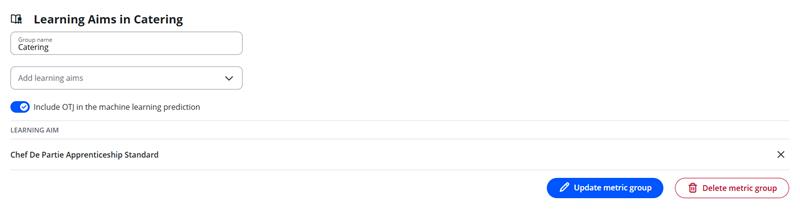
Admins can choose whether the Machine Learning Model includes OTJ. This is controlled using a toggle in each Metric Group.
- ON → OTJ is included in the model.
- OFF → OTJ is excluded from the model (default setting).
Steps
How to Enable or Disable OTJ for a Metric Group
- Click Metrics in the navigation menu.
- Click the title of the Metric Group you want to update.
- Click Manage metric group.
- Use the toggle to enable or disable OTJ for that group.
Tips & Notes
- Each Metric Group can have different OTJ settings depending on how the Centre structures programmes.
- The default Machine Learning Model excludes OTJ until manually enabled.
- Changes take effect immediately and will be reflected in ML‑based risk predictions.
Terminology
Please note that terminology used in this article may differ depending on your Centre.
Related Articles
Need Help?
If you encounter any issues or have questions, please contact Onefile Support or your internal support channels.