
Overview
The BKSB integration automatically syncs learner data and assessment results between BKSB and Onefile Eportfolio. Once enabled, the integration performs daily automated updates to ensure both systems remain aligned and learner progress is accurately reflected.
Initial Setup
- After enabling the integration, allow up to 24 hours (overnight) for Onefile to complete the initial download of BKSB user data.
- Learners are matched automatically when their email addresses are identical in both systems.
- Matched learners' assessment results appear instantly on the BKSB page of their portfolio.
- Email addresses must be verified in Onefile for matching to occur.
Automated Processes and Frequency
| Update | Description | Frequency |
|---|---|---|
| Get BKSB Users | Finds new or updated users on BKSB and syncs them into Onefile. | Once a day (overnight) |
| Match BKSB Users | Matches users in both systems where email addresses are identical. | Once a day (overnight) |
| Get BKSB Assessments | Imports new assessments and updates existing ones. | Once a day (overnight) |
Diagnostic Report
A report titled BKSB Unmatched is available under the Diagnostics section of the Centre Manager Reports page.
The report contains two sections:
- Section 1: Onefile learners not matched to BKSB.
- Section 2: BKSB learners not matched to Onefile.
Fixing Unmatched Learners
- Ensure the learner’s email address matches in both systems.
- If updated in BKSB → Changes sync in the next Get BKSB Users overnight run.
- If updated in Onefile → Matching occurs in the next Match BKSB Users run.
BKSB Databridge Users
If your Centre uses Databridge, please contact BKSB for advice before enabling the API integration. Databridge may already be syncing data, and enabling the API integration unnecessarily could cause duplication or conflicts.
Multiple Centres
The integration supports organisations with multiple Onefile centres. Use the same API Key and Token across all centres when enabling the integration.
BKSB Page in the Learner Portfolio
Once matched, a learner’s BKSB results appear on the BKSB tab inside their Onefile portfolio, giving assessors quick access to diagnostic and assessment scores.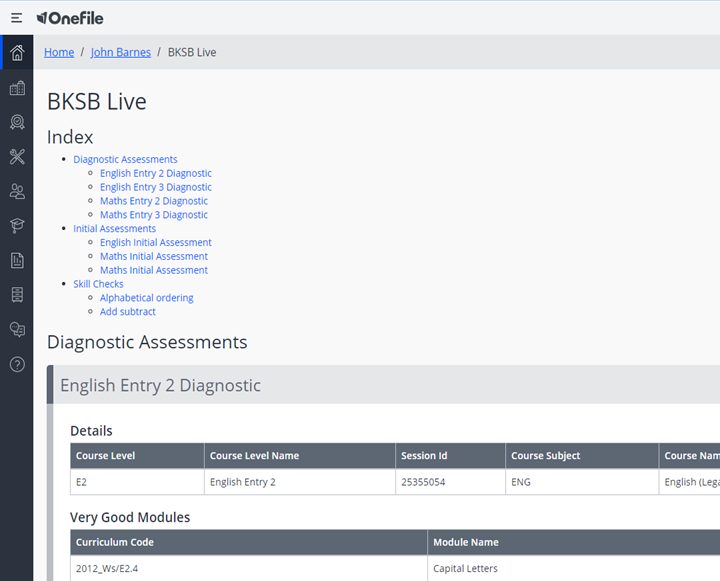
Troubleshooting
| Issue | Solution |
|---|---|
| Learner not matched | Verify that email addresses match and are verified in Onefile. |
| Assessment data missing | Wait for the overnight sync or check that the learner’s BKSB account is active. |
| Integration not working | Check API Key and Token settings and ensure the integration is enabled. |
Terminology
The terminology used in this article may differ depending on your Centre’s configuration.
Related Articles
Need Help?
If you encounter any issues or have questions, please contact Onefile Support or your internal support channels.