
Overview
If a user’s account has been linked to an incorrect email address or no longer requires access, you can remove their account from a Keychain. This action should be carried out carefully to avoid disrupting a user’s access across multiple centres.
Who Can Use This Feature?
This feature can be used by the following user role:
- Centre Manager
Centre Settings
No additional Centre Settings are required to remove a user from a Keychain.
Steps to Remove an Account from a Keychain
Step 1 – Open the Users Area
Click Users on the left navigation bar.
Step 2 – Search for the User
Use the search bar to find the user whose account needs to be unlinked.
Step 3 – Open the User’s Account
Click Account within the user’s profile.
Step 4 – Unlink the Account
Click Unlink Account to remove the user from the Keychain.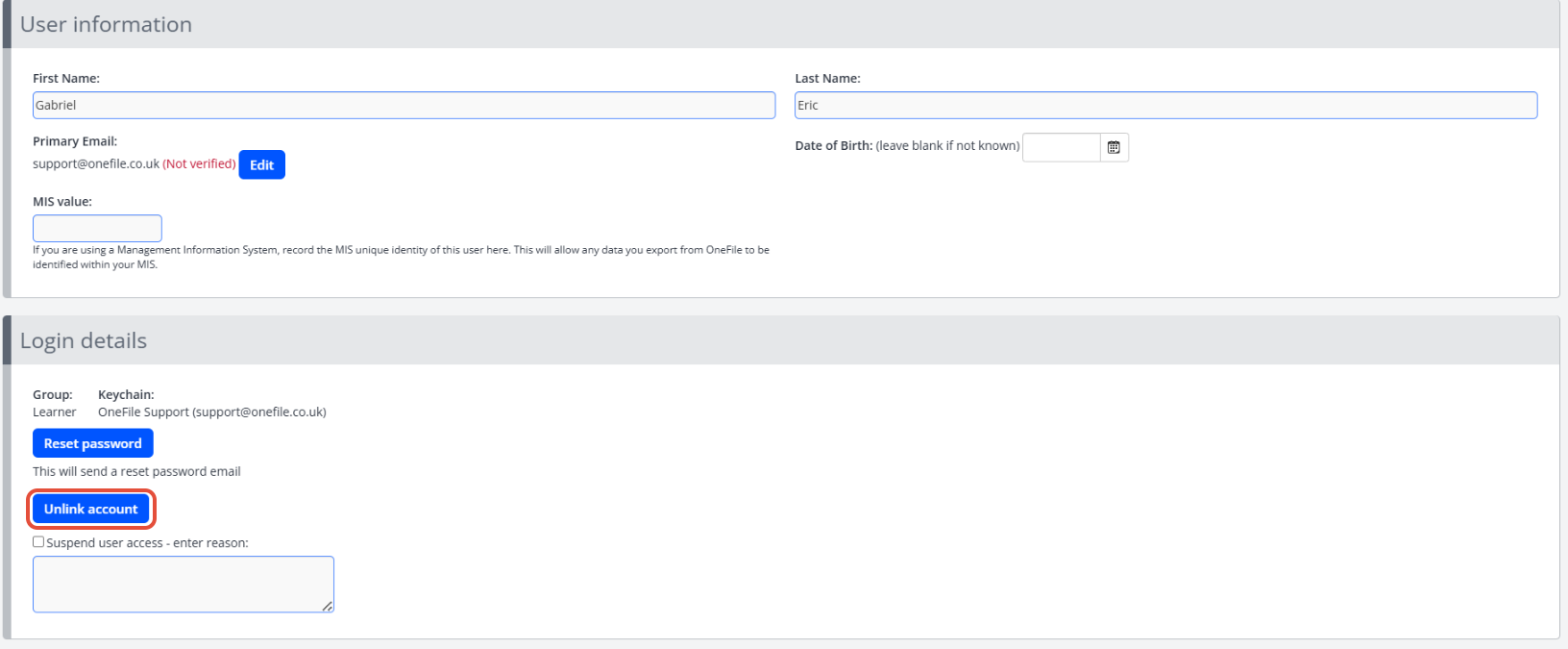
✅ Tip: Always double‑check the user's correct email before unlinking to prevent accidental access issues.
Terminology
❓ Need Help?
If you encounter any issues or have questions, please contact Onefile Support or your internal support channels.