
Overview
Centre Managers and staff can report on learners who have not logged recent Off‑The‑Job (OTJ) activity. This supports monitoring of Active Learning requirements and ensures timely intervention where no OTJ has been recorded.
Reporting Methods
There are two main ways to report on OTJ inactivity:
- Dashboard Charts
- Reporting Suite
Dashboard Charts
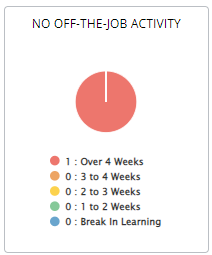
A dedicated dashboard chart is available for Centre Managers, Centre Monitors, Assessors, and Trainee Assessors to quickly identify learners who have not logged OTJ activity.
How to Enable the OTJ Dashboard Chart (Centre Managers)
- Click Centre in the navigation menu.
- Click Dashboard.
- Tick No Off‑The‑Job Activity.
This report will then display learners who have not logged OTJ time within:
- Over 4 weeks
- 3 to 4 weeks
- 2 to 3 weeks
- 1 to 2 weeks
- On a Break in Learning
Reporting Suite
The field Last OTJ Activity Date is available in several reports and can be added as a column for OTJ monitoring.
Reports Containing “Last OTJ Activity Date”
- Learner Database Report
- Off‑The‑Job Report
- Progress Reviews
- Active Learning
Tips & Notes
- Use dashboard charts for quick triage and reporting suite for detailed analysis.
- Combine OTJ inactivity data with learner status filters to spot trends and risks early.
- Regular monitoring supports Active Learning compliance requirements.
Terminology
Terminology used in this article may differ depending on your Centre’s configuration or funding model.
Related Articles
- How to set a Reminder Task for OTJ Activity (Active Learning)
- Off‑The‑Job Reporting
- Learner Database Report
- Why can’t I see the option to mark an entry as Off‑The‑Job?
Need Help?
If you encounter any issues or have questions, please contact Onefile Support or your internal support channels.