Reduced Support Availability – 19th January 2026

Just a quick heads-up! On 19th January 2026, our support and qualifications team will be attending a  Training and Development Meeting, so our response times may be a little slower than usual. 

But don’t worry — you can still find answers quickly by searching our Help Centre for guides and FAQs. If you need further assistance, feel free to submit a ticket. and we’ll get back to you as soon as we can.

If your issue is urgent, please make sure to set the priority accordingly when submitting your request.

Thanks for your understanding!

Upcoming System Update: Eportfolio & Learning Journal

On Wednesday 21st January 2026, we’ll be rolling out a series of enhancements and fixes to Eportfolio.

Release Notes
Full details of the changes can be found here.  

⏱️ Scheduled Downtime
Please note that there will be a brief service interruption between 07:00 and 07:30 AM on the day of the update.

⚠️Action Required
To avoid any data loss, make sure you’re logged out and have saved all work before 07:00 AM.


Upcoming System Update: Enrol and RPL

On 16th January 2026, we’ll be rolling out a series of improvements to Enrol and RPL.

Full details of the changes can be found in the release notes below:

Downtime: There will be no product downtime.

Submit a ticket Log in

Verifying Your Email Address in OneFile

Step-by-Step Guide

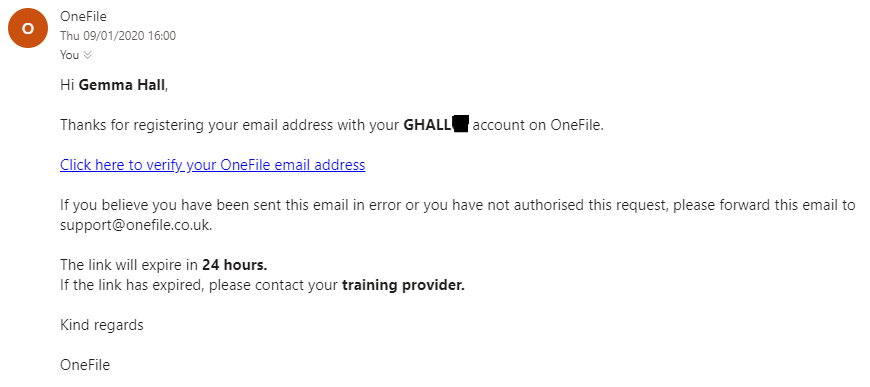
When you add a new email address to your OneFile profile, a verification email will be sent to you from:

verification@onefile.co.uk

The email will contain a link. Once clicked, your email address will be verified—as long as the link hasn’t expired. 

If the Link Has Expired

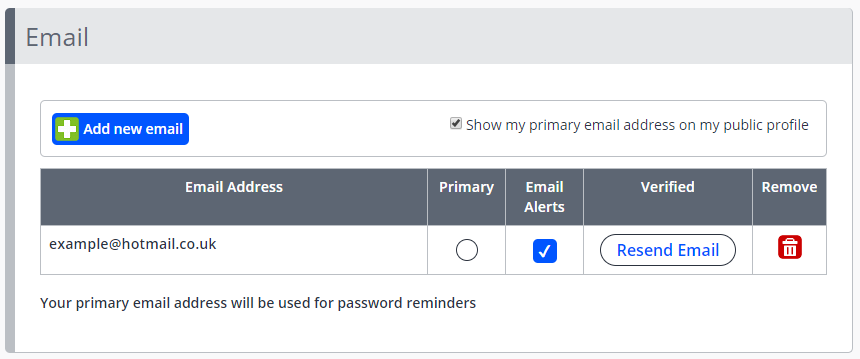
If the verification link has expired, follow these steps to resend the email:

  1. Click your name in the top-right corner of OneFile.
  2. Select Profile.
  3. Click Email Preferences.
  4. Click Resend Email.

The Resend Email option will also appear automatically each time you log in, until your email address is either verified or removed.


How to Know If You're Verified

If you see a check mark icon in the Verified column of your Email Preferences, your email address has been successfully verified.

Did you find it helpful? Yes No

Send feedback
Sorry we couldn't be helpful. Help us improve this article with your feedback.